Flutter app development is growing rapidly and now powers over 45% of new cross-platform apps as of 2025. Backed by Google, Flutter continues to evolve and now offers smarter, more efficient builds across both Android and iOS. With the latest stable release, Flutter 3.38 has brought improved web hot reload and polished desktop refinements, enough to make it one of the fastest build-and-test cycles in the industry.
It doesn’t even stop here! The real excitement is growing around the Flutter 4.0 release. Expect it to come with Impeller 2.0 for smoother rendering, Dart 4.x for faster compile times, and many more exciting features like this.
Today’s Flutter development guide for 2025 will be a roadmap for developers, startups, and tech enthusiasts. You’ll get to explore practical techniques and real industry insights around this framework. Read on!
Key Takeaways
- Flutter app development is cost-effective due to a shorter development cycle and tools availability.
- Flutter is suitable for building apps for multiple industries, including fintech, healthcare, enterprise, and so on.
- With strong community support and frequent Google updates, Flutter ensures stability.
- Advanced state management ensures efficient UI updates, while Pub.dev packages allow developers to quickly redefine features.
What Is Flutter and Why It Dominates App Development in 2025?
Flutter offers an all-in-one development toolkit with a single codebase to build apps for any preferred platforms. It is built on Google’s robust engineering standard and uses Dart’s reactive model. You will get high-speed and native-like performance on every platform.
A Brief History of Flutter
Flutter started its journey with a Google experiment called Sky in 2015. The goal was to create extremely fast Android apps. Following this, Google has released the first official version, Flutter 1.0. It came with a widget-based design system. Over time, Flutter released new versions, capable of building apps for both Android and iOS. Each of the following versions added more features and improved performance.
- Flutter 2.0: Beyond just mobile, the version was released to build web apps as well. This includes Chrome, Firefox, Safari, and Edge, with more stable performance and reduced crashes.
- Flutter 3.0: This version launched in May 2022 and became fully multi-platform beyond mobile and web. It targeted macOS, Linux, and Windows with improved graphics.
- Flutter 3.16+: Released on November 15, 2023, Flutter came as a more efficient and fast-loading framework. It offers faster rendering with WebAssembly compilation.
In short, over the past few years, the consistent evolution of Flutter has set it as a leading open-source technology. According to recent surveys, Flutter has become one of the most widely used cross-platform frameworks (around 46% of framework-using developers report using it), and over 90% of surveyed Flutter developers are satisfied with the visual quality and performance of their apps.
How Flutter App Development Works
Flutter utilizes the Reactive architecture, where the app UI automatically changes when your app’s data changes. Every element on the screen is a widget, which makes building and customizing the UI easier.
Flutter Architecture Explained
Flutter is a specialized 3-layer architecture.
- The first one is the Framework layer, which contains all the widgets. It handles layout and UI logic. As needed, the widget gets updated when data changes.
- Second is the Engine layer which connects to Flutter’s graphics library. It manages the rendering pixels where UI elements will be placed in the frame.
- The final layer is the Embedder layer. It connects the engine to the platform where the app will run. Above all these layers, Dart executes the app’s code and manages UI updates.
Setting Up the Flutter Development Environment
To start using Flutter, you must install the Flutter software (SDK), then set up tools for each platform and configure the code editor. Choose between Android Studio and VS Code. Finally, build apps, debug code, and test your app on virtual devices.
Flutter Setup on Windows / macOS / Linux
First, you have to install Flutter on your operating system. Download the Flutter SDK on Windows. Then add it to your system path to make the Flutter commands work. Developers run the Flutter Doctor. It is essential to check that the installation is in good health.
To install Flutter on Windows, you must install Visual Studio tools. On macOS, you need Xcode to build and run iOS apps. Additionally, on Linux, install compilers and development libraries such as GCC, Clang, and GTK.
Common Setup Errors and Fixes
Here are the most common errors that developers often face:
- Flutter fails to locate the Android development tools. It mostly happens if you don’t install the SDK or if the path isn’t set.
- Developers often find that the cmdline-tools component is missing. Install Android command-line tools from Android Studio’s SDK Manager.
- There is also a common error named “Unable to locate Gradle script” in Flutter. It suggests that something is preventing Gradle from running properly on your machine. Check if there are unwanted programs or antivirus software on your machine.
- While installing on Windows, you may face a common error like “CMake is not installed”. To fix it, open Visual Studio Installer, edit your installation, run the flutter doctor command, and ensure all the components are installed.
- Another frequently reported issue is the error “Flutter: Unable to find bundled Java version.” Try reinstalling Android Studio or downloading a fresh JBR and pointing Gradle to it.
Flutter App Lifecycle & Build Process
Flutter’s development process lies within its structured process. It equips hot reload through which you can change the UI and see results almost instantly. Also, if needed, Flutter architecture only rebuilds the parts of the UI, keeping the performance as it is. Developers utilize some tools to track data changes and update only the necessary widgets.
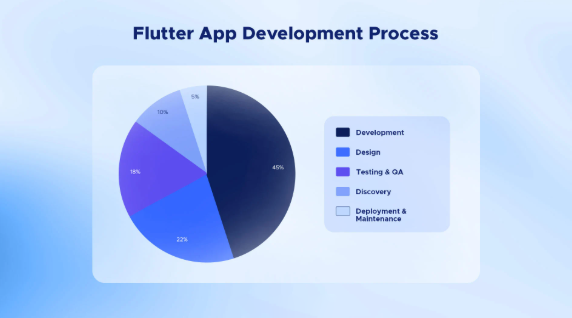
Flutter App Development Process
Flutter performance optimization becomes easier when you take advantage of the advanced design patterns. Here we have listed some go-to Flutter development techniques you can consider.
State Management Approaches
With the proper Flutter state manager approaches, you can better handle data and UI updates. Choose based on your app size and complexity.
Leave a Reply